What is QUADBIN?
QUADBIN is a hierarchical spatial indexing system that assigns a unique 64-bit integer identifier to any tile in a Web Mercator grid. It’s the spatial backbone of RaQuet, enabling efficient tile lookups and spatial queries.
Think of QUADBIN as a way to give every possible map tile — at any zoom level — a unique “address” that can be stored in a single integer column and indexed efficiently by databases.
Why QUADBIN for RaQuet?
RaQuet uses QUADBIN because it provides:
- Single-column spatial index — One INT64 column encodes location AND zoom level
- Efficient range queries — Spatially adjacent tiles have numerically similar IDs (Morton/Z-order)
- Parquet row group pruning — Database engines can skip irrelevant data blocks
- Hierarchical structure — Parent-child relationships between zoom levels are implicit
The Web Mercator Tile System
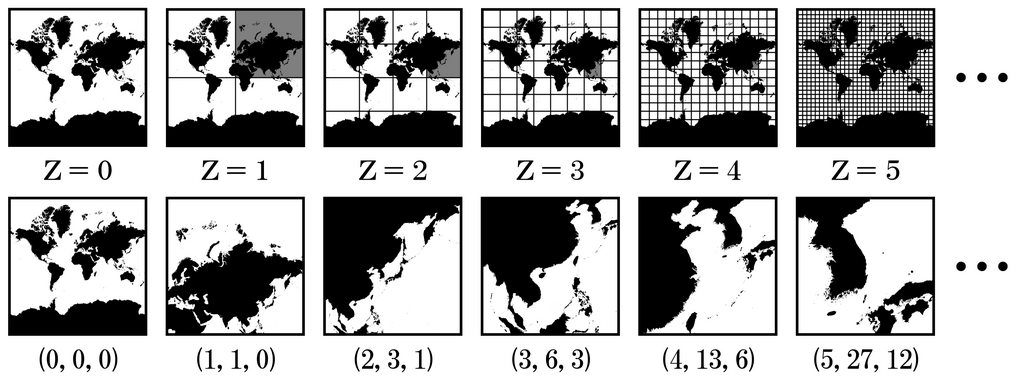
QUADBIN is built on the Web Mercator tile system (also called XYZ, TMS, or Slippy Map tiles). This is the same tiling scheme used by Google Maps, OpenStreetMap, and virtually all web mapping platforms.
At each zoom level z:
- The world is divided into
2^z × 2^ztiles - Each tile is identified by
(x, y, z)coordinates - Zoom 0 has 1 tile, zoom 1 has 4 tiles, zoom 10 has ~1 million tiles

QUADBIN Encoding
QUADBIN encodes (x, y, z) tile coordinates into a 64-bit integer using a clever bit layout:
Bit layout (64 bits):
┌────────┬──────────┬─────────────────────────────────────────┬─────────────┐
│ Header │Resolution│              Index (Morton code)         │ Unused bits │
│ 4 bits │  5 bits  │            2×z bits                      │ set to 1    │
└────────┴──────────┴─────────────────────────────────────────┴─────────────┘
  0x4     0-26        Interleaved x,y bits                      Padding
Key properties:
- Header (bits 60-63): Always
0b0100(value 4) for cell mode - Resolution (bits 52-59): Zoom level (0-26)
- Index (variable): Morton code (Z-order curve) of x,y coordinates
- Unused bits: Set to 1 for consistent sorting
Morton Code (Z-order curve)
The x and y coordinates are interleaved bit-by-bit to create a Morton code. This is the key to QUADBIN’s spatial efficiency — nearby tiles have similar Morton codes, which means they’re stored close together in sorted order.
Example: Tile (5, 3) at zoom 3
  x = 5 = 101 (binary)
  y = 3 = 011 (binary)

Interleave: x₂y₂x₁y₁x₀y₀ = 1·0·0·1·1·1 = 100111 (binary) = 39
Algorithm: Tile to QUADBIN
Here’s the complete algorithm to convert tile coordinates to a QUADBIN cell ID:
def tile_to_quadbin(x: int, y: int, z: int) -> int:
    """
    Convert tile coordinates (x, y, z) to QUADBIN cell ID.

    Args:
        x: Tile X coordinate (0 to 2^z - 1)
        y: Tile Y coordinate (0 to 2^z - 1)
        z: Zoom level (0 to 26)

    Returns:
        64-bit QUADBIN cell ID
    """
    # Header for cell mode: 0b0100_1000... = 0x4800...
    header = 0x4800000000000000

    # Resolution stored in bits 52-56 (5 bits)
    resolution = z << 52

    # Interleave x and y bits to create Morton code
    index = 0
    for i in range(z):
        # x bits go to odd positions, y bits to even positions
        index |= ((x >> i) & 1) << (2 * i + 1)
        index |= ((y >> i) & 1) << (2 * i)

    # Shift index to its position (after header and resolution)
    index <<= (52 - 2 * z)

    # Set unused low bits to 1 for consistent sorting
    unused_bits = (1 << (52 - 2 * z)) - 1

    return header | resolution | index | unused_bits
Algorithm: QUADBIN to Tile
The reverse operation extracts tile coordinates from a QUADBIN ID:
def quadbin_to_tile(quadbin: int) -> tuple[int, int, int]:
    """
    Convert QUADBIN cell ID to tile coordinates.

    Args:
        quadbin: 64-bit QUADBIN cell ID

    Returns:
        Tuple of (x, y, z) tile coordinates
    """
    # Extract zoom level from bits 52-56
    z = (quadbin >> 52) & 0x1F

    # Extract Morton index
    index = (quadbin >> (52 - 2 * z)) & ((1 << (2 * z)) - 1)

    # De-interleave x and y from Morton code
    x, y = 0, 0
    for i in range(z):
        x |= ((index >> (2 * i + 1)) & 1) << i
        y |= ((index >> (2 * i)) & 1) << i

    return x, y, z
Example Calculations
Example 1: Tile (0, 0, 0) — The entire world
>>> tile_to_quadbin(0, 0, 0)
5192650370358181887

# In hex: 0x4800FFFFFFFFFFFF
# Header:     0x4 (cell mode)
# Resolution: 0 (zoom 0)
# Index:      0 (no bits)
# Unused:     all 1s
Example 2: Tile (1, 2, 3) — A tile at zoom 3
>>> tile_to_quadbin(1, 2, 3)
5196930832277643263

# In hex: 0x48039FFFFFFFFFFF
# Header:     0x4
# Resolution: 3
# Index:      001110 (Morton code for x=1, y=2)
# Unused:     remaining bits set to 1
Example 3: Reverse lookup
>>> quadbin_to_tile(5196930832277643263)
(1, 2, 3)
Why Morton Order Matters
The Morton code (Z-order curve) creates a space-filling curve that preserves spatial locality:
Morton order at zoom 2:
┌────┬────┬────┬────┐
│ 0  │ 1  │ 4  │ 5  │
├────┼────┼────┼────┤
│ 2  │ 3  │ 6  │ 7  │
├────┼────┼────┼────┤
│ 8  │ 9  │ 12 │ 13 │
├────┼────┼────┼────┤
│ 10 │ 11 │ 14 │ 15 │
└────┴────┴────┴────┘
Notice how:
- Adjacent tiles have similar indices
- Each quadrant contains consecutive ranges (0-3, 4-7, 8-11, 12-15)
- Child tiles at zoom N+1 are grouped together
This property enables:
- Range queries: “All tiles in Europe” becomes a small set of index ranges
- Row group pruning: Parquet can skip entire data blocks based on min/max statistics
- Efficient sorting: Sorted data clusters spatially related tiles
QUADBIN in RaQuet
In a RaQuet file, each row’s block column contains a QUADBIN cell ID:
-- Get tile coordinates from a RaQuet file (raw Parquet, manual filtering)
SELECT
    block,
    (block >> 52) & 31 AS zoom,
    -- x and y require de-interleaving (use quadbin library)
FROM read_parquet('raster.parquet')
WHERE block != 0
LIMIT 5;
With the DuckDB Raquet Extension, you get helper functions and automatic metadata handling:
INSTALL raquet FROM community;
LOAD raquet;

-- Cleaner API (metadata row excluded automatically)
SELECT
    block,
    quadbin_resolution(block) AS zoom,
    quadbin_to_tile(block) AS tile_xyz
FROM read_raquet('raster.parquet')
LIMIT 5;
For spatial queries, the QUADBIN library functions handle the encoding/decoding:
-- Using CARTO Analytics Toolbox
SELECT *
FROM raquet_table
WHERE block = QUADBIN_FROMLONGLAT(-3.7, 40.4, 10);
Reference Implementations
Production-ready QUADBIN libraries:
| Language | Library | Functions |
|---|---|---|
| Python | quadbin-py | tile_to_cell(), cell_to_tile() |
| JavaScript | @carto/quadbin | tileToCell(), cellToTile() |
| SQL | CARTO Analytics Toolbox | QUADBIN_FROMTILE(), QUADBIN_TOTILE() |
Python example:
import quadbin

# Tile to QUADBIN
cell = quadbin.tile_to_cell((x, y, z))

# QUADBIN to tile
x, y, z = quadbin.cell_to_tile(cell)

# Geographic point to QUADBIN at zoom 10
cell = quadbin.point_to_cell(longitude, latitude, 10)
Further Reading
- Bing Maps Tile System — The foundation for Web Mercator tiling
- H3 Hierarchical Index — Inspiration for QUADBIN’s bit layout
- Morton Code (Z-order curve) — The space-filling curve used for spatial locality
- CARTO QUADBIN Documentation — CARTO’s official QUADBIN reference