
What is RaQuet?
Specification (0.5.0)
RaQuet defines an open specification for storing raster data in Apache Parquet. Each tile becomes a row, each band becomes a column. Standard format, no proprietary extensions.
Read the specification →Tools
Convert any GDAL-supported raster (GeoTIFF, NetCDF, COG) to RaQuet. Query with DuckDB, visualize in the browser, or load into your data warehouse.
View CLI reference →Ecosystem
RaQuet is designed to work with the modern analytics stack. Full support for BigQuery, Snowflake, Databricks, DuckDB, and PostgreSQL through CARTO's Analytics Toolbox.
See supported engines →Why Parquet for Raster Data?
We believe people want to access their raster data like any other type of data: in SQL.
You shouldn’t have to export data and perform vector-raster intersections outside your analytics platform. But today, you can’t just query a raster. Raster data remains locked in GIS- and HPC-oriented formats like GeoTIFF/COG and Zarr — powerful, but largely invisible to SQL engines.
RaQuet builds on the pioneering work of PostGIS Raster, which first demonstrated SQL-based raster analytics. But instead of being tied to PostgreSQL, RaQuet uses Apache Parquet — an open columnar format supported by virtually every modern analytics engine.
Key insight: With RaQuet, raster files become tables in your data warehouse. Instead of treating rasters as opaque files, you can query them, join them with vector data, and govern them — all in the same system.
RaQuet Principles
RaQuet’s goal is to align GIS with the rest of the analytics industry — particularly Open Table Formats like Apache Iceberg and the separation of storage and compute.
- SQL-First — Query raster data with standard SQL in DuckDB, BigQuery, Snowflake, Spark, or any Parquet-compatible engine
- Tables, Not Files — Rasters become queryable tables, not opaque binary blobs
- Interoperable — Works with existing data warehouse infrastructure and governance
- Cloud-Native — QUADBIN spatial indexing enables efficient tile lookups with row group pruning
- Open Format — Standard Parquet with no proprietary extensions
RaQuet vs COG vs Zarr
RaQuet isn’t competing with traditional raster formats — it targets a different problem entirely: interoperability in the analytics world.
| COG (GeoTIFF) | Zarr | RaQuet | |
|---|---|---|---|
| Best for | GIS pipelines, visualization | Scientific computing (HPC) | Analytics / lakehouse / SQL |
| Ecosystem | GDAL, QGIS, rasterio | Xarray, Dask, Pangeo | DuckDB, BigQuery, Snowflake, Spark |
| Strength | Window reads, tiling, overviews | Chunked arrays, parallel compute | SQL queries, joins with vector data |
| Limitation | Not queryable in SQL | Requires specialized runtimes | Designed for tiles, not window reads |
RaQuet works out of the box in most analytics systems — and often provides comparable or better performance than pipelines involving export/import steps.
Sample Data
Try these example RaQuet files — query them directly from cloud storage:
| Dataset | Source | Source Size | RaQuet Size | URL |
|---|---|---|---|---|
| World Elevation | AAIGrid | 3.2 GB | 805 MB | world_elevation.parquet |
| World Solar PVOUT | AAIGrid | 2.8 GB | 255 MB | world_solar_pvout.parquet |
| CFSR SST | NetCDF | 854 MB | 75 MB | cfsr_sst.parquet |
| TCI (Sentinel-2) | GeoTIFF | 224 MB | 256 MB | TCI.parquet |
| Spain Solar GHI | GeoTIFF | — | 15 MB | spain_solar_ghi.parquet |
Data sources: Global Solar Atlas, Copernicus Sentinel-2, CFSR Reanalysis
Example Queries
Get Elevation at Madrid
LOAD raquet;

SELECT
    ST_RasterValue(block, band_1, ST_Point(-3.7038, 40.4168), metadata) AS elevation_meters
FROM read_raquet_at('https://storage.googleapis.com/raquet_demo_data/world_elevation.parquet', -3.7038, 40.4168);
Sum Solar Potential in a Region
LOAD raquet;

SELECT (ST_RegionStats(
    band_1, block,
    'POLYGON((-4 40, -3 40, -3 41, -4 41, -4 40))'::GEOMETRY,
    metadata
)).*
FROM read_raquet(
    'https://storage.googleapis.com/raquet_demo_data/world_solar_pvout.parquet',
    'POLYGON((-4 40, -3 40, -3 41, -4 41, -4 40))'::GEOMETRY
);
Time-Series Analysis
LOAD raquet;

SELECT
    YEAR(time_ts) AS year,
    AVG((ST_RasterSummaryStats(band_1, metadata)).mean) AS avg_sst
FROM read_raquet('https://storage.googleapis.com/raquet_demo_data/cfsr_sst.parquet')
GROUP BY YEAR(time_ts)
ORDER BY year;
Key functions:
read_raquet(file)/read_raquet_at(file, lon, lat)— Table functions with metadata propagation and spatial filteringST_RasterValue(block, band, point, metadata)— Returns pixel value at a POINTST_RasterSummaryStats(band, metadata)— Per-tile statistics (count, sum, mean, min, max, stddev)ST_RegionStats(band, block, geometry, metadata)— Aggregate statistics within a polygonST_Intersects(block, geometry)— Spatial filter (EPSG:4326)ST_Clip(band, block, geometry, metadata)— Extract pixels within a geometryST_NormalizedDifference(band1, band2, metadata)— Band math (e.g., NDVI)
How It Works
Think of RaQuet as storing a raster where each tile is a row and each band is a column.
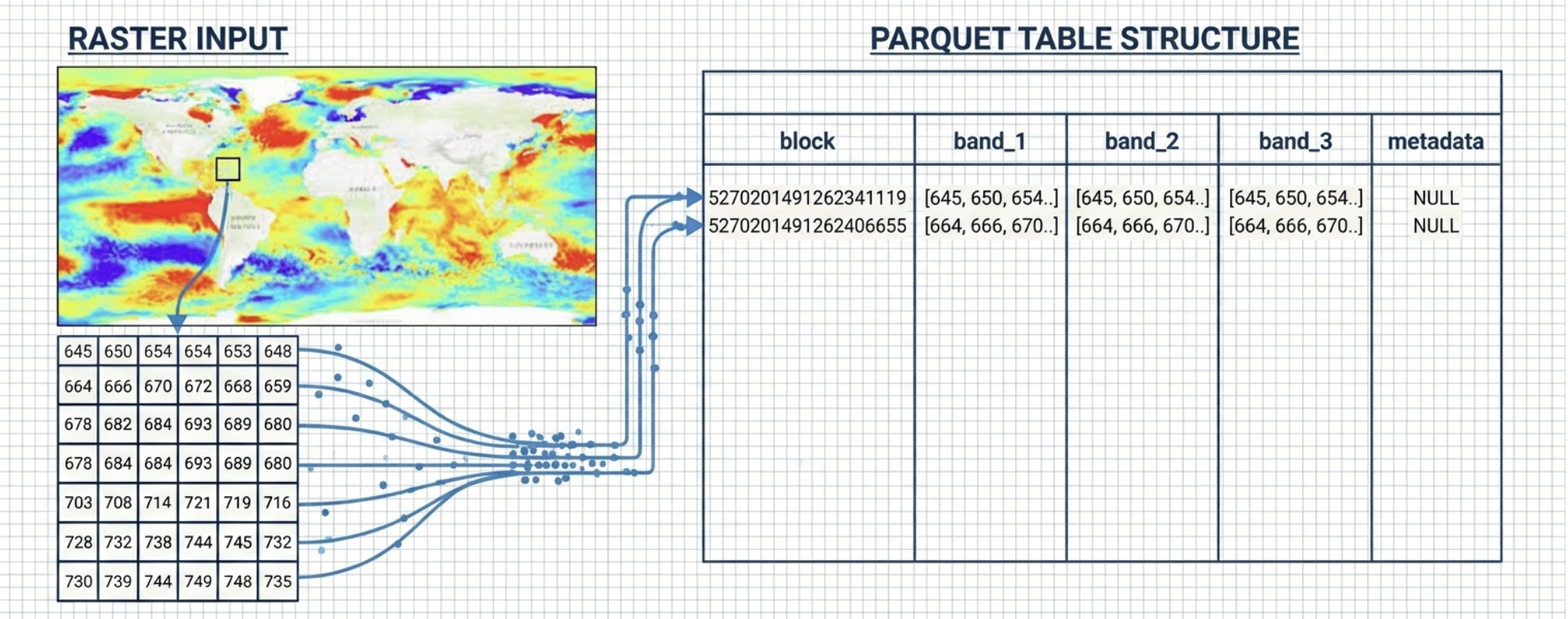
- block — QUADBIN cell ID (tile location + zoom level)
- band_N — Gzip-compressed pixel data (row-major)
- metadata — JSON metadata in the
block=0row
RaQuet requires Web Mercator (EPSG:3857) projection to leverage QUADBIN spatial indexing for efficient filtering.
Getting Started
# Install
pip install raquet-io

# Convert a raster to RaQuet
raquet-io convert raster input.tif output.parquet

# Validate the output
raquet-io validate output.parquet

# Inspect metadata
raquet-io inspect output.parquet
Roadmap: Apache Iceberg Integration
We’re working on registering RaQuet datasets as Apache Iceberg tables — enabling rasters to be discovered and queried alongside vector data in your lakehouse.
GeoParquet brought vector data into the lakehouse. RaQuet does the same for raster. Iceberg unifies them under a single governance layer.
Changelog
v0.5.0
- Per-Tile Statistics Columns: Optional pre-computed statistics (
count,min,max,sum,mean,stddev) as plain Parquet columns alongside each band. Enables UDF-free analytics on any SQL engine — no decompression needed. - New CLI options:
--tile-statsflag for conversion,--overviews none,--streaming,--workersfor parallel conversion, andpartitioncommand for spatial partitioning. - Metadata signal:
tile_statisticsandtile_statistics_columnsfields in metadata JSON when tile stats are present. - Negligible overhead: Typically <1% file size increase for the statistics columns.
v0.4.0
- Interleaved Band Layout: New
band_layout: "interleaved"option stores all bands in a singlepixelscolumn using Band Interleaved by Pixel (BIP) format. This can reduce HTTP requests for RGB visualization by ~40%. - Lossy Compression: Support for JPEG and WebP compression for photographic imagery. Achieves 10-15x smaller files compared to gzip for satellite imagery.
- New metadata fields:
band_layout,compression_qualityfor controlling lossy compression.
v0.3.0
- Time dimension support: Added
time_cfandtime_tscolumns for NetCDF/CF convention time series data. - CF calendar support: Full support for standard, proleptic_gregorian, 360_day, 365_day, and other CF calendars.
- Enhanced metadata: Added
timesection withcf:units,cf:calendar,resolution,interpretation,count, andrangefields. - Processing metadata: Optional
processingsection to document source CRS, resampling, and creation info. - Custom metadata extension: Defined convention for custom fields under
customobject or with namespace prefix. - File identification: Added
raquet:versionhint in Parquet file-level metadata for fast identification.
v0.2.0
- Initial public release: Core specification for storing raster tiles in Parquet with QUADBIN spatial indexing.
- Band columns: Sequential band storage with gzip compression.
- Overview pyramids: Support for multi-resolution tile pyramids.
- Rich metadata: Band statistics, histograms, nodata values, color interpretation.
Acknowledgments
Special thanks to Even Rouault for his invaluable feedback on the RaQuet specification. His deep expertise in geospatial formats and GDAL has helped shape RaQuet into a more robust and well-documented standard.